← CineCinch Home / CineCinch Press Kit
CineCinch Press Kit
Everything a writer or creator needs to cover CineCinch accurately: facts, honest limitations, screenshots, and a free review license with no strings.
What CineCinch is
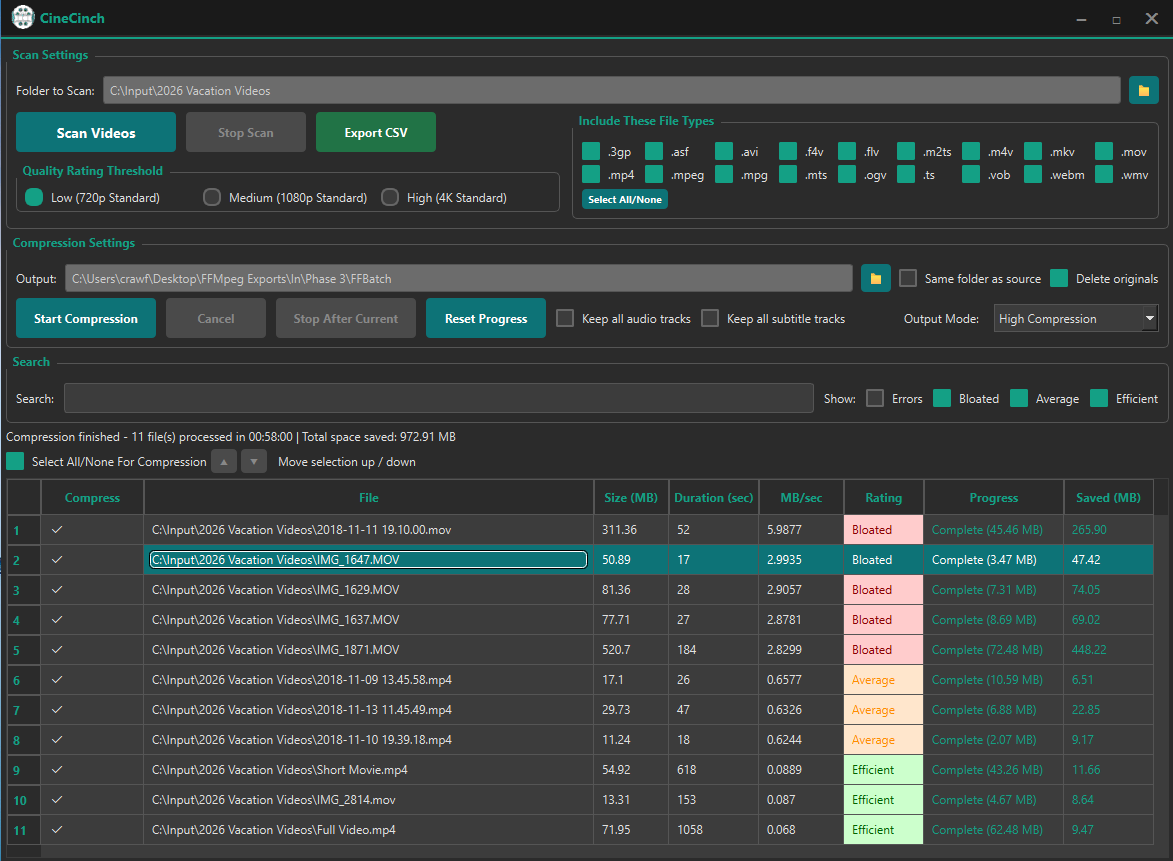
CineCinch is a Windows app by a solo developer that answers a question most video tools skip: which files are actually wasting your disk space? It scans a folder or drive and ranks every video by megabytes per second of playback, so the true space hogs surface instantly. Then it batch-compresses just those files to H.265, with quality adapted per file, and it keeps an output only if it is genuinely smaller than the original.
Fact sheet
- Platform: Windows 10/11 (64-bit), distributed through the Microsoft Store
- Price model: pay once, no subscription; free 7-day trial with unlimited scanning and compression capped at 10 files
- Privacy: 100 percent local processing; no cloud upload, no account, no telemetry
- Encoding: CPU-only x265 (H.265/HEVC), a deliberate quality-per-byte choice; no GPU/NVENC encoding
- Diagnosis: ranks every video by MB per second of playback before anything is compressed
- Safety: outputs are kept only if smaller; originals are deleted only on verified success when the user opts in
- Independent review: Softpedia editorial review, 4.5/5
- Developer: Chad Crawford, solo developer
Story angles that fit real coverage
- The diagnosis gap: HandBrake, Tdarr, and every converter assume you already know which files to compress. Ranking a library by MB per second is the missing first step, and it regularly shows that a handful of files hold most of the reclaimable space.
- The no-Docker option: media-server audiences are told to run Tdarr or Unmanic; CineCinch is the answer for readers who found containers, nodes, and flows to be overkill for one full drive.
- Local-only in an upload-everything category: most "compress a video" advice sends people to websites with upload caps; family videos never leave the machine here.
Assets and screenshots
The scan view, ranked by MB per second, is the money shot: screenshot-v2.png. Logo: logo.png. Demo video: youtube.com/watch?v=s87YNsqcQIg (also embedded on the homepage). Additional screenshots or a walkthrough on request.

Want to test it properly?
Any writer or creator who wants to evaluate CineCinch gets a free full license, no strings attached, with no expectation of coverage and no conditions on what you conclude. Email support@cinecinch.com and mention where you publish.
Contact
Chad Crawford, developer: support@cinecinch.com · @CineCinch · Store listing: apps.microsoft.com/detail/9pb21kbs42ms